Need job

Looking for job in Europe. Please contact thru LinkedIn profile.

Wednesday, April 24, 2013

Sharepoint REST with cyrillic column names

To use link like that {site}/_vti_bin/listdata.svc/{list}?$filter=Название eq 'London'
you need to encode cyrillic word.
Here is a service to do it http://meyerweb.com/eric/tools/dencoder/

Proper link is {site}/_vti_bin/listdata.svc/{list}?$filter=%D0%9D%D0%B0%D0%B7%D0%B2%D0%B0%D0%BD%D0%B8%D0%B5 eq 'London'

Thursday, February 21, 2013

Remote upgrade Sharepoint solution with PowerShell

Hello everybody!
Here is a script to upgrade Sharepoint solution on remote server.
U need to allow the remote powershell on the server.
U can replace the sriptblock with any commands. For example Add-Solution)

net use W: /delete
net use W: \\serverName\C$\folder
copy "C:\Users\user\Documents\Visual Studio 2012\Projects\Project\bin\Debug\Project.wsp" W:\
$s = New-PSSession -computerName serverName
Invoke-Command -Session $s -Scriptblock {Add-PSSnapin Microsoft.SharePoint.Powershell;Update-SPSolution -Identity Project.wsp -LiteralPath c:\folder\Project.wsp -GACDeployment}
Remove-PSSession $s

Monday, February 18, 2013

SPItemEventReceiver invoke source detection

How to detect who has update item? User from web browser or web service?
The solution is to store "Label" in thread data slot.
Sync receivers like Adding and Updating executes in the same thread as update code, in my case is web service.

Update Ready-to-use code
using System;
using System.Threading;

namespace Common
{
    public class Threading
    {
        public static void MarkThreadWith(string mark, object val)
        {
            LocalDataStoreSlot store = Thread.GetNamedDataSlot(mark);
            if (store == null)
            {
                store = Thread.AllocateNamedDataSlot(mark);
            }

            Thread.SetData(store, val);
        }

        public static bool CheckThreadFor(string mark, T val) where T : IEquatable
        {
            LocalDataStoreSlot store = Thread.GetNamedDataSlot(mark);
            if (store == null)
            {
                return false;
            }
            try
            {
                T newSlotData = (T)Thread.GetData(store);
                return newSlotData.Equals(val);
            }
            ///wrong thread
            catch (NullReferenceException)
            {
                return false;
            }
        }
    }
}

Saturday, January 12, 2013

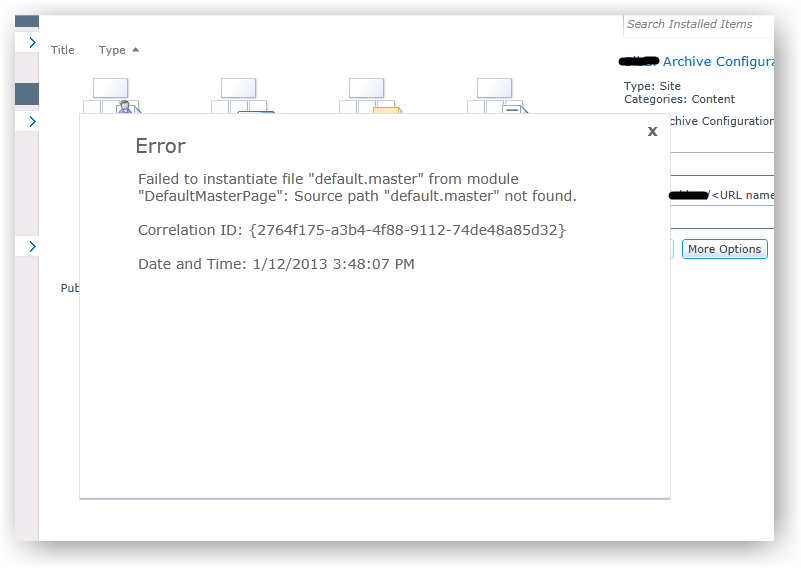
Masterpage location error while creating site from site template


Failed to instantiate file "default.master" from module
"DefaultMasterPage"

I found one possible reason for the error.
File "webtemp_SiteDefinition1.xml" contains something like that:

<?xml version="1.0" encoding="utf-8"?>
<Templates xmlns:ows="Microsoft SharePoint">
  <Template Name="ArchiveSiteDefinition"
            ID="10001">
    <Configuration ID="0"
                   Title="Archive Template Configuration Title"
                   Hidden="FALSE"
                   ImageUrl="/_layouts/images/CPVW.gif"
                   Description="Archive Template Configuration Description"
                   DisplayCategory="Content">
    </Configuration>
  </Template>
</Templates>

Bold text above can't contains white spaces, and maybe other symbols which nonalphanumeric.

Will work - "ArchiveSiteDefinition"
Will not work - "Archive SiteDefinition"

File "webtemp_SiteDefinition1.xml" must be located in folder with name ArchiveSiteDefinition in your studio project.

Monday, September 10, 2012

SPMonitoredScope for Sharepoint 2007

using System;
using Microsoft.Practices.SPG.Common.Logging;
using Microsoft.Practices.SPG.Common.ServiceLocation;

namespace MyApp.Utils
{
    public class MonitoredScope : IDisposable
    {
        DateTime time;
        string _scopeName;

        private ILogger Logger
        {
            get
            {
                return SharePointServiceLocator.Current.GetInstance();
            }
        }

        public MonitoredScope(string scopeName)
        {
            time = DateTime.Now;
            _scopeName = scopeName;
            Logger.TraceToDeveloper(string.Concat("Enter scope: " + scopeName), 
                1313, 
                Microsoft.SharePoint.Administration.TraceSeverity.Monitorable, 
                "TWP");
        }

        public void Dispose()
        {
            DateTime time2 = DateTime.Now;

            Logger.TraceToDeveloper(string.Concat("Leave scope: " + _scopeName, "; Duration: " + (time2 - time).ToString()),
                1313,
                Microsoft.SharePoint.Administration.TraceSeverity.Monitorable,
                "TWP");
        }
    }
}

Save conflict problem

Its very popular problem then you use complex solution with receivers and workflows(WF).
Symptoms are corrupted WF execution and bad ULS messages like that:

-----------------------------------------------------------------------------------------------------
09/04/2012 18:48:23.88 w3wp.exe (0x0CD0)                       0x1940 Windows SharePoint Services   Workflow Infrastructure       88xr Unexpected WinWF Internal Error, terminating workflow Id# 94139810-91fb-457a-9b12-d21a68989b91

09/04/2012 18:48:23.88 w3wp.exe (0x0CD0)                       0x1940 Windows SharePoint Services   Workflow Infrastructure       98d4 Unexpected System.Workflow.Runtime.Hosting.PersistenceException: Save Conflict  Your changes conflict with those made concurrently by another user. If you want your changes to be applied, click Back in your Web browser, refresh the page, and resubmit your changes. ---> Microsoft.SharePoint.SPException: Save Conflict  Your changes conflict with those made concurrently by another user. If you want your changes to be applied, click Back in your Web browser, refresh the page, and resubmit your changes. ---> System.Runtime.InteropServices.COMException (0x81020037): Save Conflict  Your changes conflict with those made concurrently by another user. If you want your changes to be applied, click Back in your Web browser, refresh the page, and resubmit your changes.
-----------------------------------------------------------------------------------------------------

To use WFs and especially with some concurrency code like receivers, you must strongly understand how WFF works.

My case on this problem:

  1. webservice listen for incoming connection and close Nintex(Workflow) task
  2. after close i write some fields to WF item
While my async receiver(updated) on WF item updating, WFF reach the next commit point, in my case its state machine change.

Its funny, the problem was resolved after i swap two lines of code. Task close and WF item update.

You must update WF item first, cause task completion becomes WF active.

If you want to use "standart" SPContext in console

If you want to use "standart" SPContext in console: www.superedge.net: How to create your own SharePoint HttpContext